Edit Levels
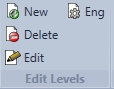
New

Adds a new level to the existing floor that was started with. Users must make sure their elevations, wall heights, joist depth are accurate before inserted or copying a new level above.
Delete

Deletes desired level.
Edit

Edits the current level a user is working on. This is important to do before adding a new level when changing joist depths.
Eng (level engineering settings)

These level engineering settings are used as defaults for the entire floor and/or roof of that specific level. A user has the capability of changing these to their desired load patterns and saving these defaults. If the user chooses to save these defaults these defaults will be used for all jobs following; but the user can still change the loads for each individual level.
Eng should always be reviewed before engineering a floor or roof system. This will ensure proper loads throughout the structure.